Useful ideas rarely arrive when your filing system is open. They appear during a conversation, between meetings, while reviewing a pull request, or when you are away from a keyboard. Asking yourself to choose the perfect project, page, tag, and format before saving the thought creates enough friction to lose it.
“Capture first, organize later” removes that decision from the moment of capture. It does not mean storing everything forever. It means separating two different jobs: preserve the useful context now, then make a calmer decision about its future.
Why separate capture from organization?
Capture and organization require different kinds of attention. Capture protects a fragile observation or commitment. Organization compares that item with existing work and decides how it should be used.
Combining both jobs produces two common failures:
- Capture failure: the idea disappears while you decide where it belongs.
- Filing failure: you save it quickly into an arbitrary place and cannot understand it later.
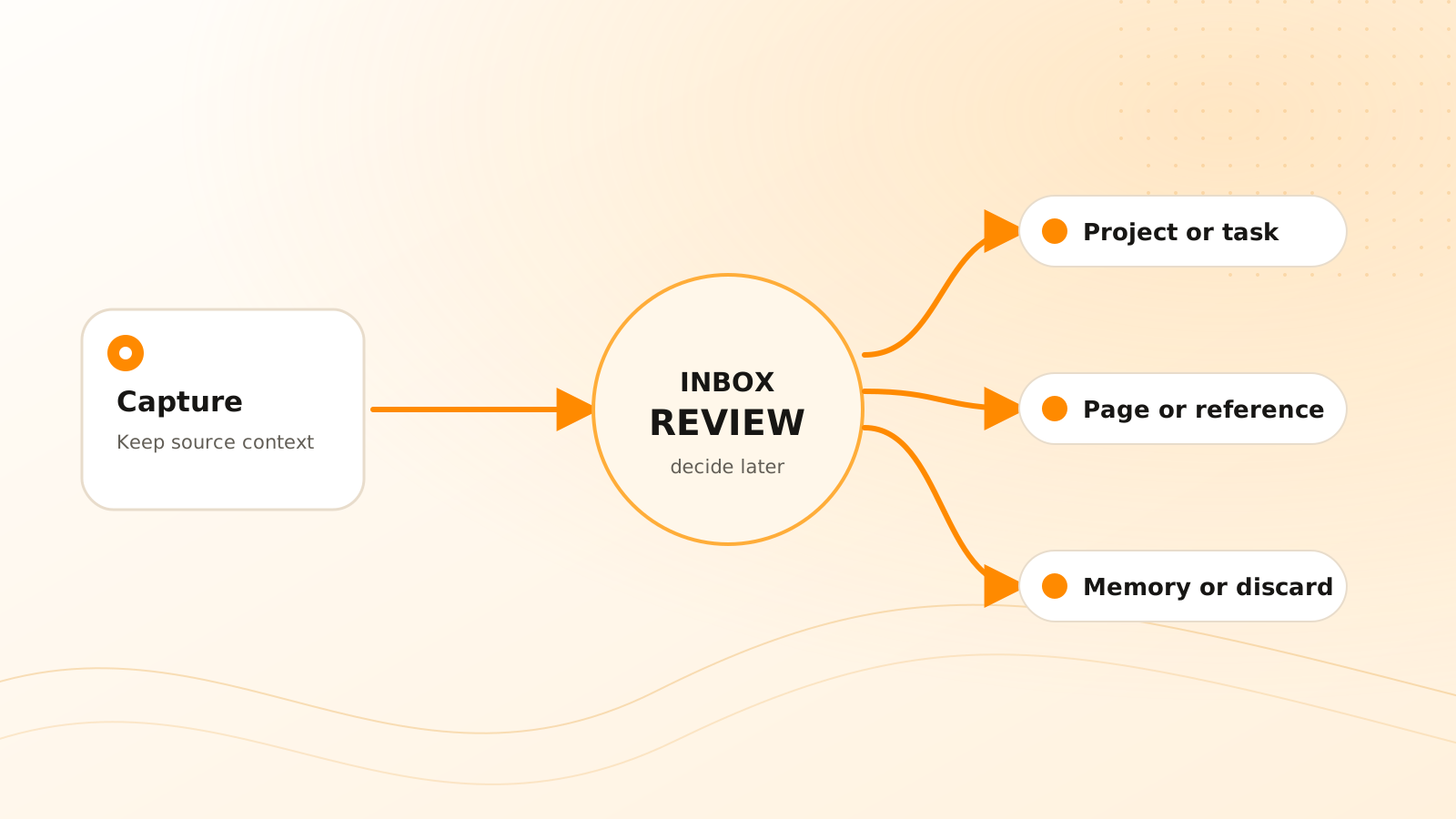
A short inbox between those steps solves both problems. The inbox is not the final home. It is a temporary queue that lets you preserve the original material and return when you have enough context to decide.
What should a good capture contain?
A useful capture needs enough information for your future self to recognize why it mattered.
For a direct note, include the observation and the situation that produced it. “Pricing concern” is weak. “Customer review: procurement needs annual invoicing before approving the pilot” preserves a source, a constraint, and a possible next step.
For connected inputs such as Slack, Gmail, or meeting notes, preserve the original source reference when the product supports it. A copied sentence without its surrounding conversation can change meaning. Source context also helps later automation distinguish a new commitment from a status update or a completed task.
Use the smallest format that preserves meaning:
- text for a concise thought or pasted passage;
- voice when speaking is faster and the surrounding context is clear;
- an image when visual evidence matters;
- a file when the original artifact needs to remain intact;
- a connected message or meeting when its provenance matters.
Clear Tangle supports several of these paths through its capture workflow. The appropriate path is the one you can use consistently without hiding where the information came from.
In Clear Tangle, the Inbox provides the pause between capture and commitment. A Slack message, voice note, image, file, or quick thought can arrive with its source intact; during review, you can discard it, connect it to a Project, turn a genuine commitment into a Task, maintain the conclusion on a Page, or preserve stable context in Memory Vault. The capture itself does not need to predict that destination.
How do you review a capture inbox?
Review should be a decision process, not a rewriting session. For each item, ask the following questions in order.
1. Is this still useful?
If the item is duplicated, obsolete, purely temporary, or no longer understandable, remove it. Keeping everything increases retrieval noise and makes the inbox feel authoritative when it is really only accumulated input.
2. Does it support an active outcome?
Connect it to the relevant project. This is often more useful than assigning a broad subject tag because the project explains why the information matters now.
3. Does someone need to do something?
Create or update a task only when the item contains a real commitment, next action, or follow-up. Preserve the source so the task keeps its reason. If the owner or date is ambiguous, leave that ambiguity visible instead of inventing precision.
4. Is it knowledge you will reuse?
Turn a stable explanation, decision, or research conclusion into a maintained page or reference. This is different from keeping every raw input. The maintained version should make the useful conclusion easier to retrieve while linking back to evidence where necessary.
5. Is it durable context?
Use memory for stable information that should influence future work: a project decision, recurring preference, accepted constraint, or important relationship. Do not promote a temporary assumption into durable memory merely because it appeared in a capture.
How often should you process the inbox?
The right interval depends on how quickly captures become stale and how many commitments they contain.
A high-volume workday may justify a ten-minute review at the end of the day. A lower-volume personal system may need two reviews per week. The important measure is not an empty inbox at all times. It is whether important items are routed before their context expires.
Use two triggers:
- a time trigger, such as the end of the workday or Friday review;
- a risk trigger, such as immediately after a customer meeting or incident where commitments cannot wait.
If review repeatedly takes too long, reduce what enters the inbox or simplify the destinations. More tags are rarely the first answer.
What can AI safely organize?
AI can suggest a project, extract a possible task, summarize a long input, or identify likely tags. Those suggestions reduce mechanical work, but they are still interpretations.
Review suggestions more carefully when they involve:
- a task completion or deadline;
- assignment to another person;
- a sensitive project or source;
- deletion or irreversible movement;
- a durable memory that may affect later answers;
- a claim that will be published or sent externally.
The safest pattern is asymmetric: allow low-risk enrichment to happen quickly, but require clearer evidence and confirmation as consequences increase.
A practical ten-minute routine
Process the capture queue
Remove obvious noise
Delete duplicates, expired reminders, and items that no longer carry enough context to be useful.
Route active work
Connect project material, create or update real tasks, and keep the original source attached.
Preserve reusable knowledge
Move stable explanations or decisions into pages, references, or carefully scoped memory.
Check the queue
Confirm that urgent commitments have owners and that uncertain suggestions remain visibly unresolved.
This routine turns capture into a dependable input channel without making the inbox a permanent archive.
Start by building the smallest useful AI second-brain loop. Once that habit works, use the questions above to decide what deserves to move beyond the inbox.
Frequently asked questions
Does capture first mean I should save everything?
No. Capture material with a plausible future use, then remove noise during review. The method delays the filing decision; it does not eliminate judgment or retention limits.
Do I need to choose a Clear Tangle Project before I capture something?
No. Capture the useful material and its source first. The Inbox gives you a later review point for choosing a Project or another destination when that decision will be more informed.
How quickly should I process an important commitment?
Process it before its context or consequence expires. A customer promise or production follow-up may need immediate review even when routine ideas can wait for the daily or weekly queue.
Can AI choose the destination for every capture?
AI can suggest a project, task, tag, summary, or memory, but suggestions that change ownership, dates, durable context, or external work should remain reviewable.
What is the minimum context a capture needs?
Keep enough to recover what happened, why it mattered, and where it came from. For connected material, preserve the original message, meeting, file, or link when possible.
Capture without breaking your flow
Use the current Clear Tangle capture paths to preserve a thought or source, then route it when you have the context to decide.
Explore capture workflows →Sources
- Multi-Modal Capture Documentation — supports the current capture methods, processing model, and source-preservation behavior described in this workflow.
- The PARA Method — Forte Labs; supports organizing retained information by actionability and current outcomes.
- Personal Information Management — William Jones and co-authors; supports the distinction between keeping information for anticipated need and finding information for a current need.